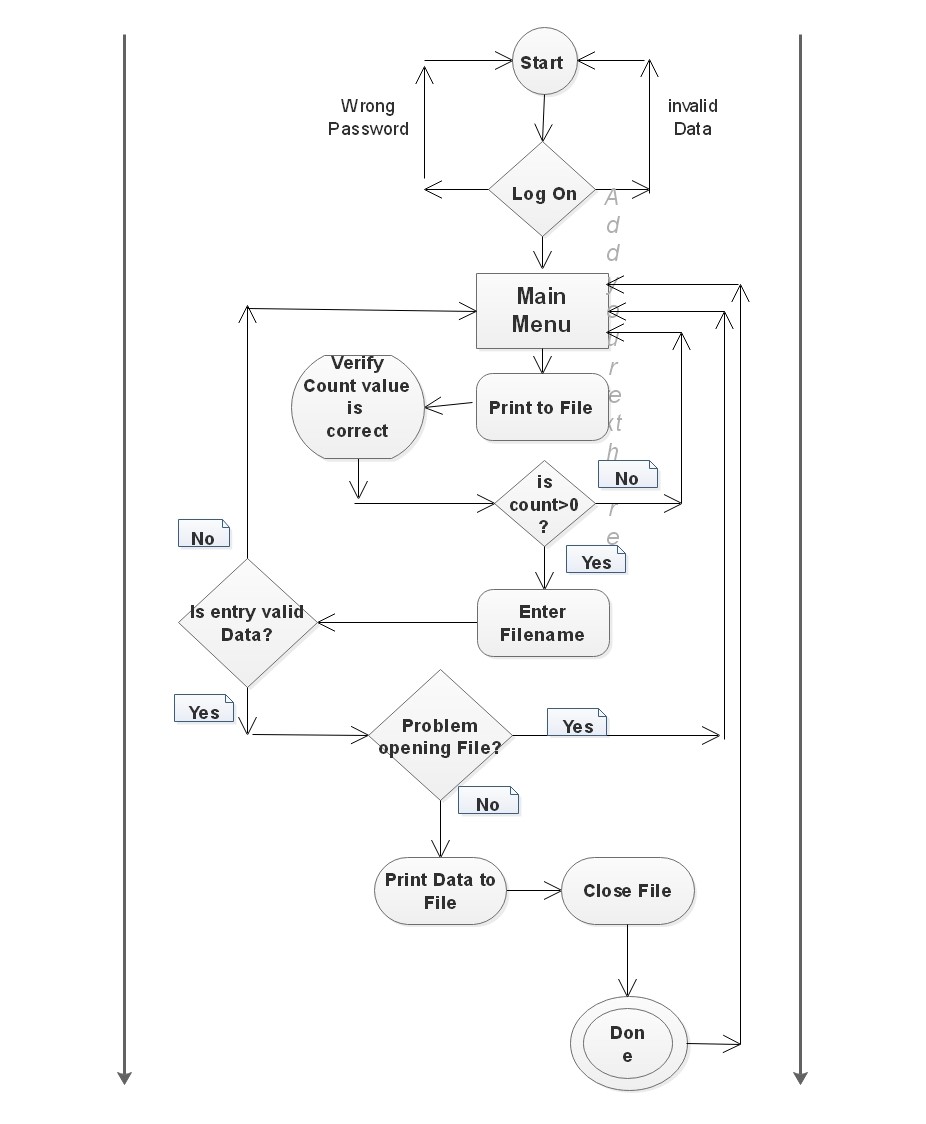
This System must be composed of a storage and financial accounting report utility For bovine Farm animals.
The software will store many farm animal attribute details or details associated with that farm animal.
These details are namely:
- Animal ID Number
- Breed
- Sex
- Purchase weight
- Purchase cost
- Date bought
- Supplier Name
- Average Cost of farm processes per bovine
- Kill weight of bovine
- Retail price/Kg for bovine
- Gross Sale price of bovine acquired
- Date bovine was sold
- A flag variable representing whether the bovine has been sold or not(1 for yes, 0 for no)
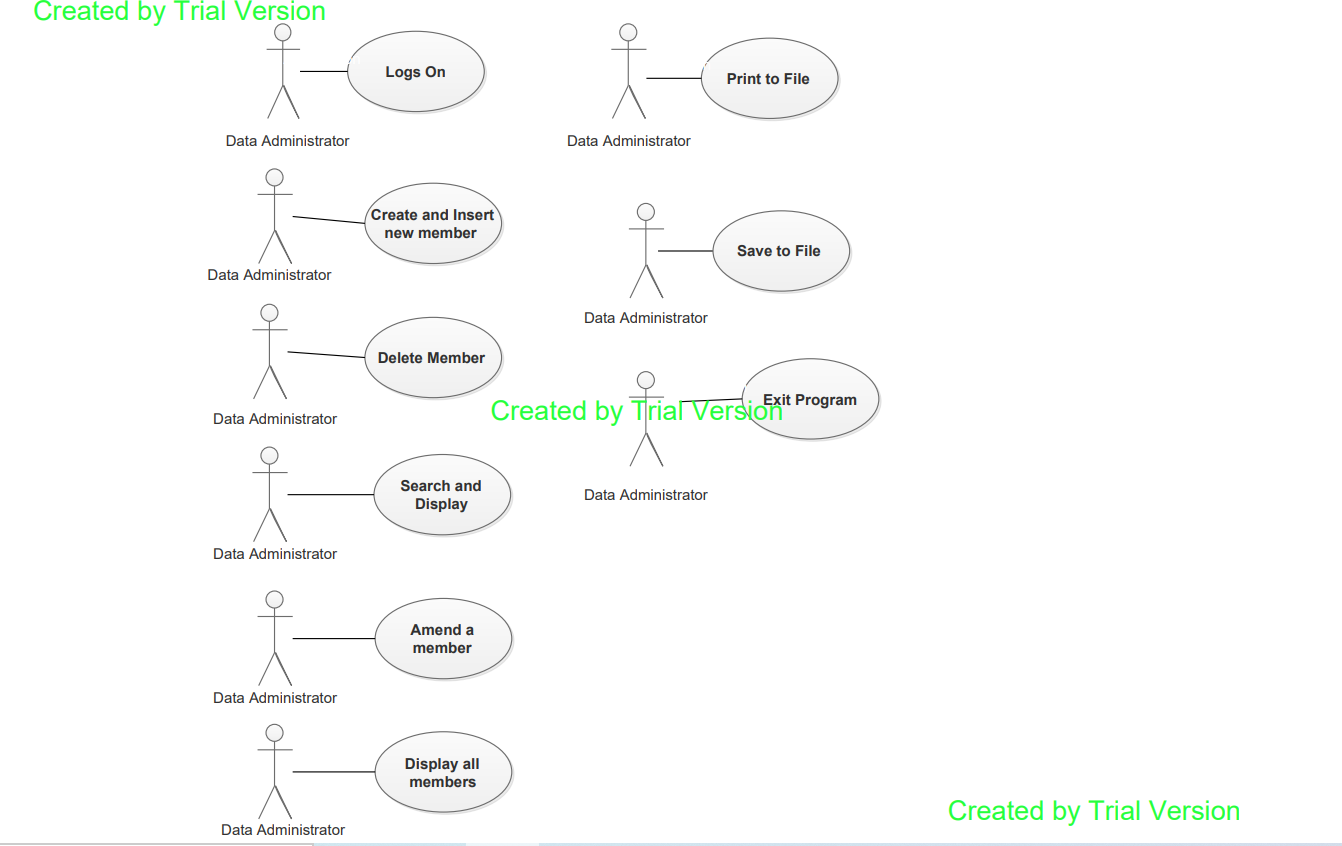
The main Actors(Individuals interacting with the system) involved are the Farm owner, Data Administrator,possibly
a department of agriculture data clerk and the programmer. However for UML modelling purposes I have included the
container object as an actor in the system. This is because the Container object/class possesses
memory availability checking and system integrity checks as part of it's functionality such as ensuring the container
is filled with data and that data is valid as well as verifying the count value is correct. Password authentication
will be required for each of the human actors with differnt levels of permissions available for each and a seperate
set of services/actions available for each (Although some of the services/actions provided may overlap).
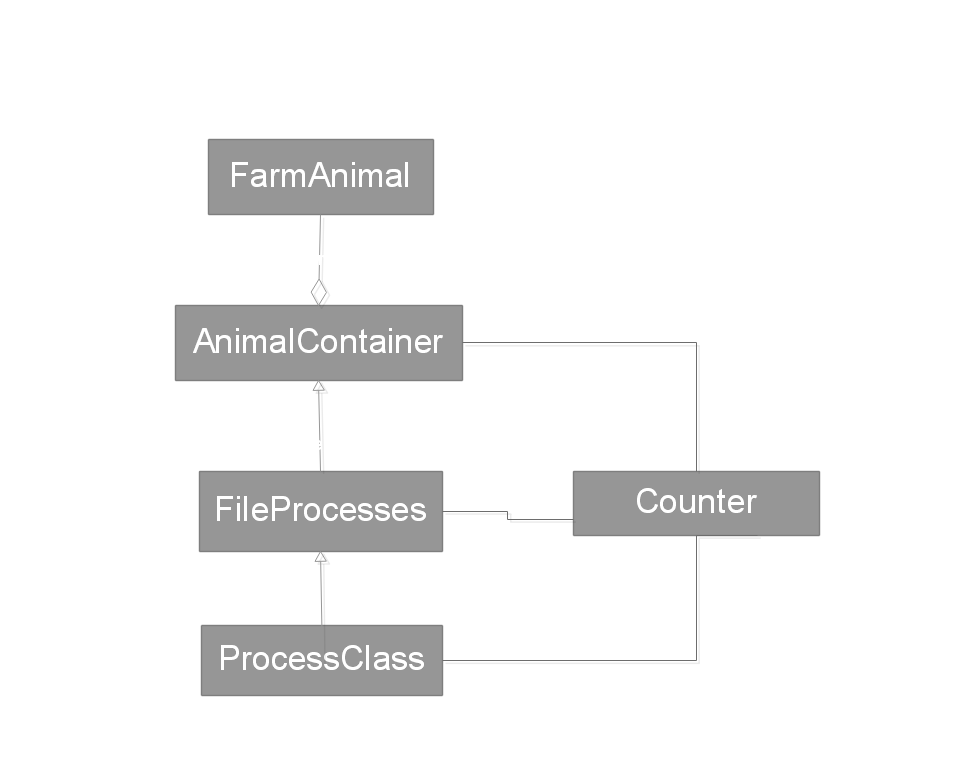
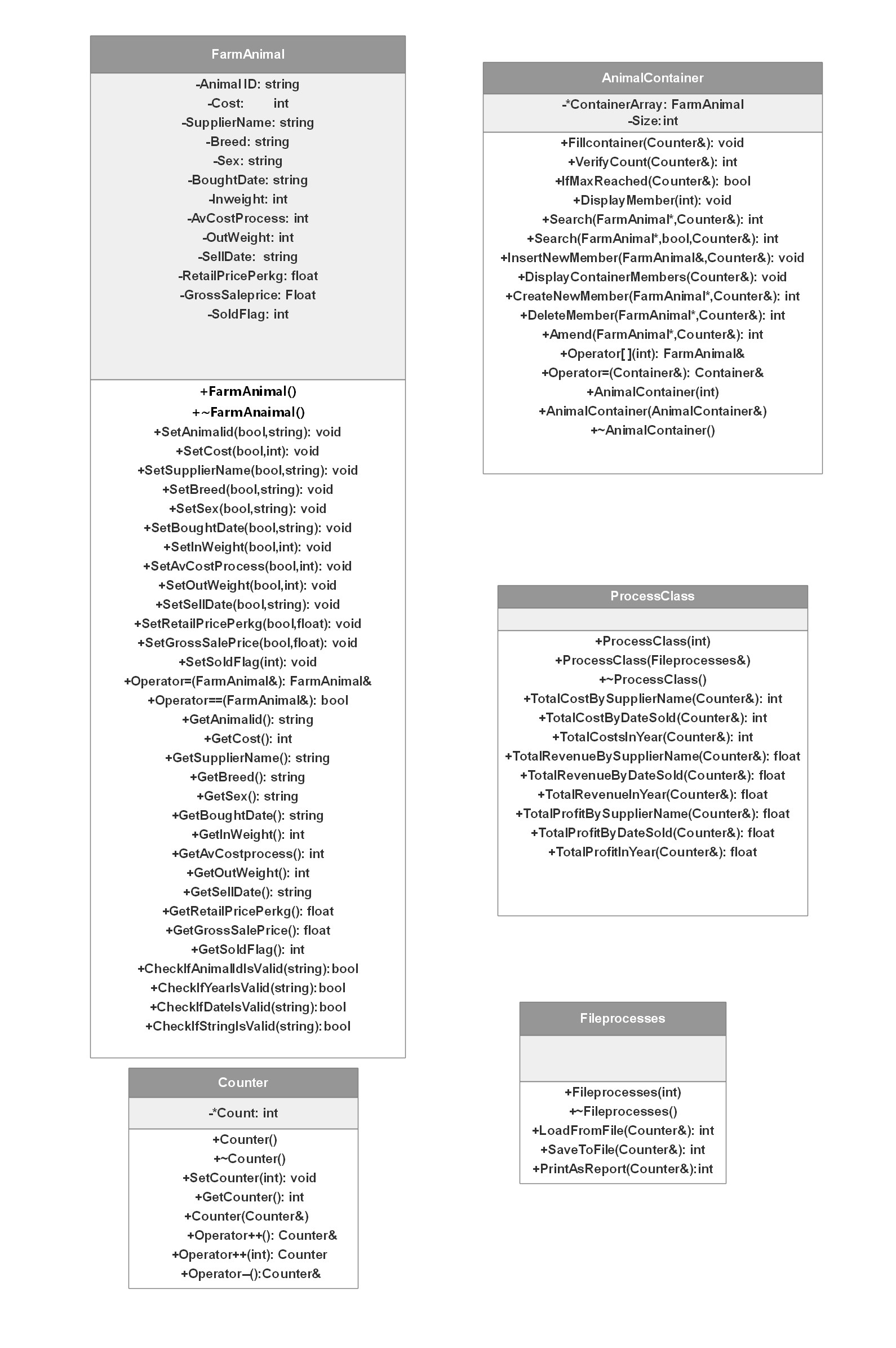
As illustrated in the above class diagram, the farm attribute details, whch are listed in this section above, should be encapsulated in a
FarmAnimal class. The FarmAnimal class should possess data validity checking mechanisms to ensure the integrity
of supplied data before it is added to the container. Containment will be applied by dynamically allocating memory
to store records of many bovines using a dynamic memory allocated data structure/container. The container class should possess
the usual functions to add, delete, amend, search for and display,initialize the container, as well as some house-keeping count
associated functions.
Fileprocesses class will be inherited from the container class with the ProcessClass inherited from fileprocesses. The Fileprocesses class
will contain file saving and loading functionality with an option to print all data to file as a report. Process class will provide financial
accounting functionality. Having a seperate inherited class dedicated to the file streaming functions goes hand in hand with the
object-orientated method of programming. Among some of the financial accounting functions provided by the Processor class include calculating
costs, revenue and profits in conjuction with parameters such as by date sold, by supplier name or within a full calender year.
The system should include provision to increase capacity of the database if requested and also a warning message is to be
transmitted to the user when the system is approaching maximum existing capacity. A specialized counter object is utilized
in such instances and will be accessible to the Container class, File processing class and the Processor class.
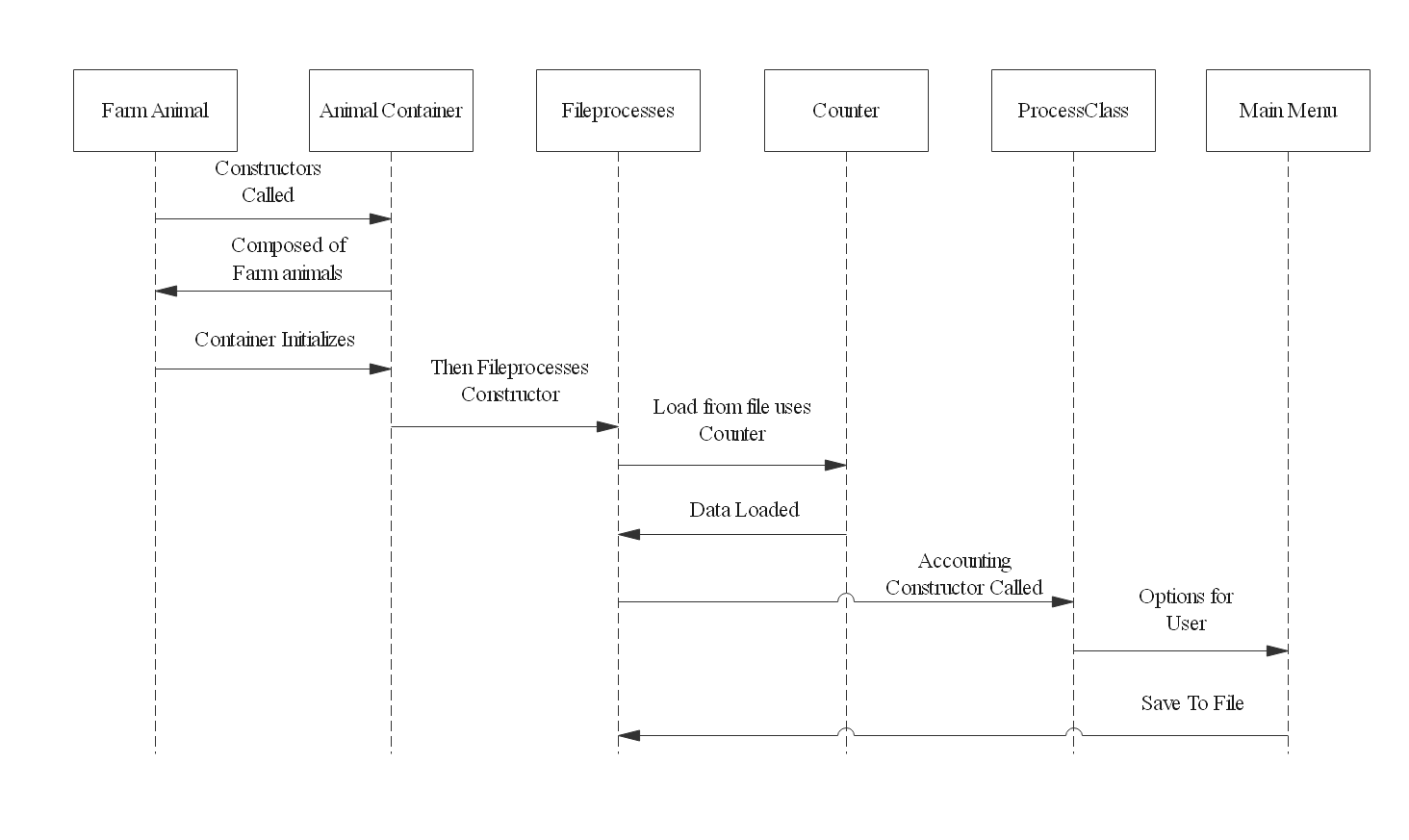
Upon launching the program the main driver should automatically create and initialize the container. The size of the
container will be decided by the user when prompted. It is up to the user to specify a size which is within the recommended
parameters and large enough to hold the total contents saved to a specific file. The driver should then present each actor
with his/her own menu of options depending on the bounds of their permissions. The main driver should be neat and compact
and of small size with a limited amount of coding and has access to all components of the written software.
Use-Case 1:         Container initializes itself.

Scenario 1a.        Container successfully initializes itself.

Pre-conditions:     Maximum size for the container has been created and set. User chooses
                    size of the container which must be less than maximum size allowed of
 		    1000 members.

Trigger:            The program is launched by a user, ie. (The Main driver has been invoked).

Description:        The container is declared and constructors are called. Memory
                    is set aside for the number of members requested. Default
                    values are used in functions to set the member variables of each
                    member to ‘unfilled’ for string values or zero for number values.

Post-condition:     Container has been initialized.

Scenario 1b.        Container unsuccessfully initializes itself.

Pre-conditions:     Maximum size for the container has been created and set.

Trigger:            The program is launched by a user ie. (The driver has been invoked).

Description:        The Container is declared and the constructor is called but the system
                    Has a problem allocating memory and a memory error/exception is
                    called or the system has a problem creating the container object and
                    the user is notified with an error message.

Post-condition:     The program ends prematurely and the user is not permitted access
                    to their main menu.

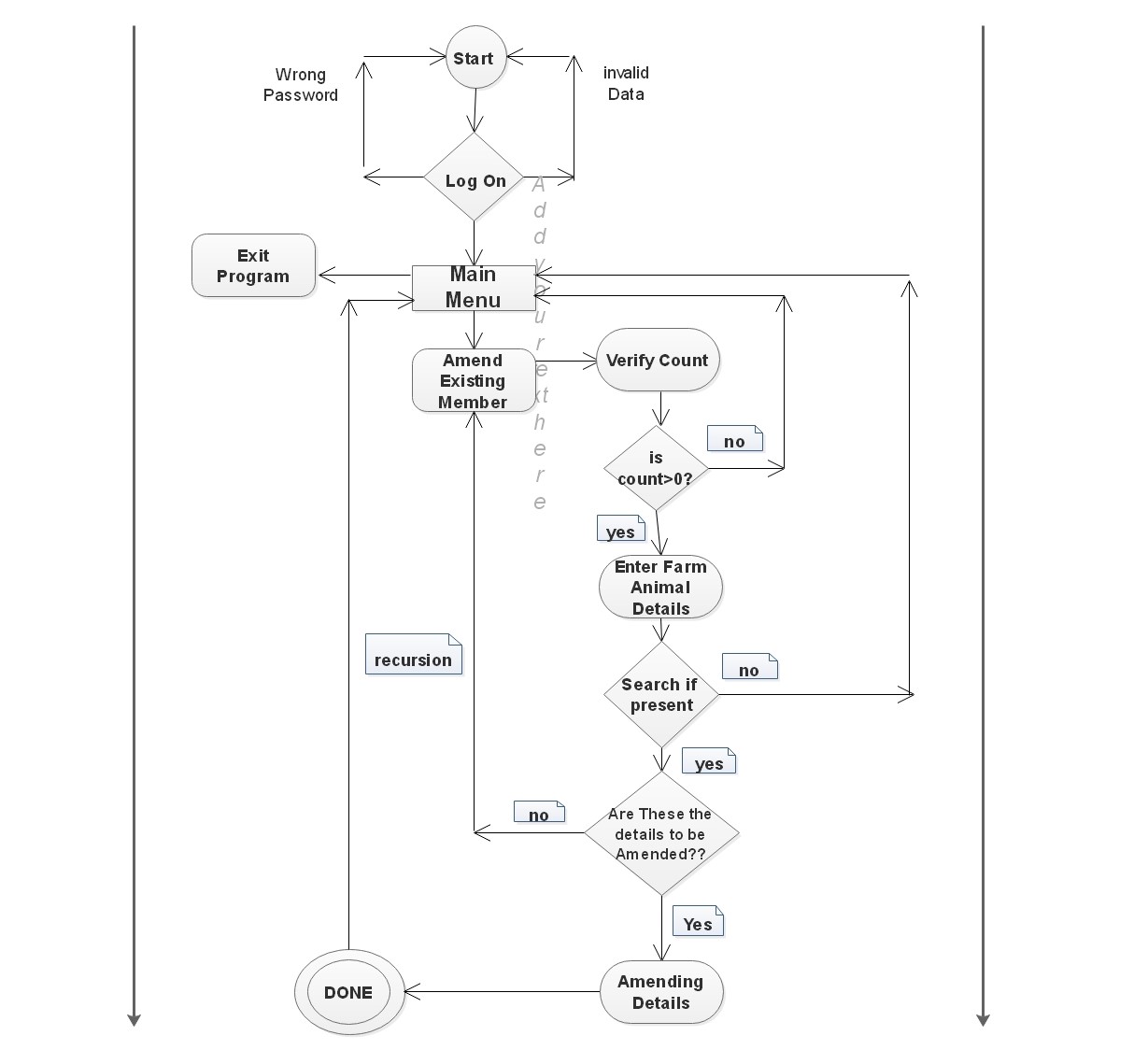
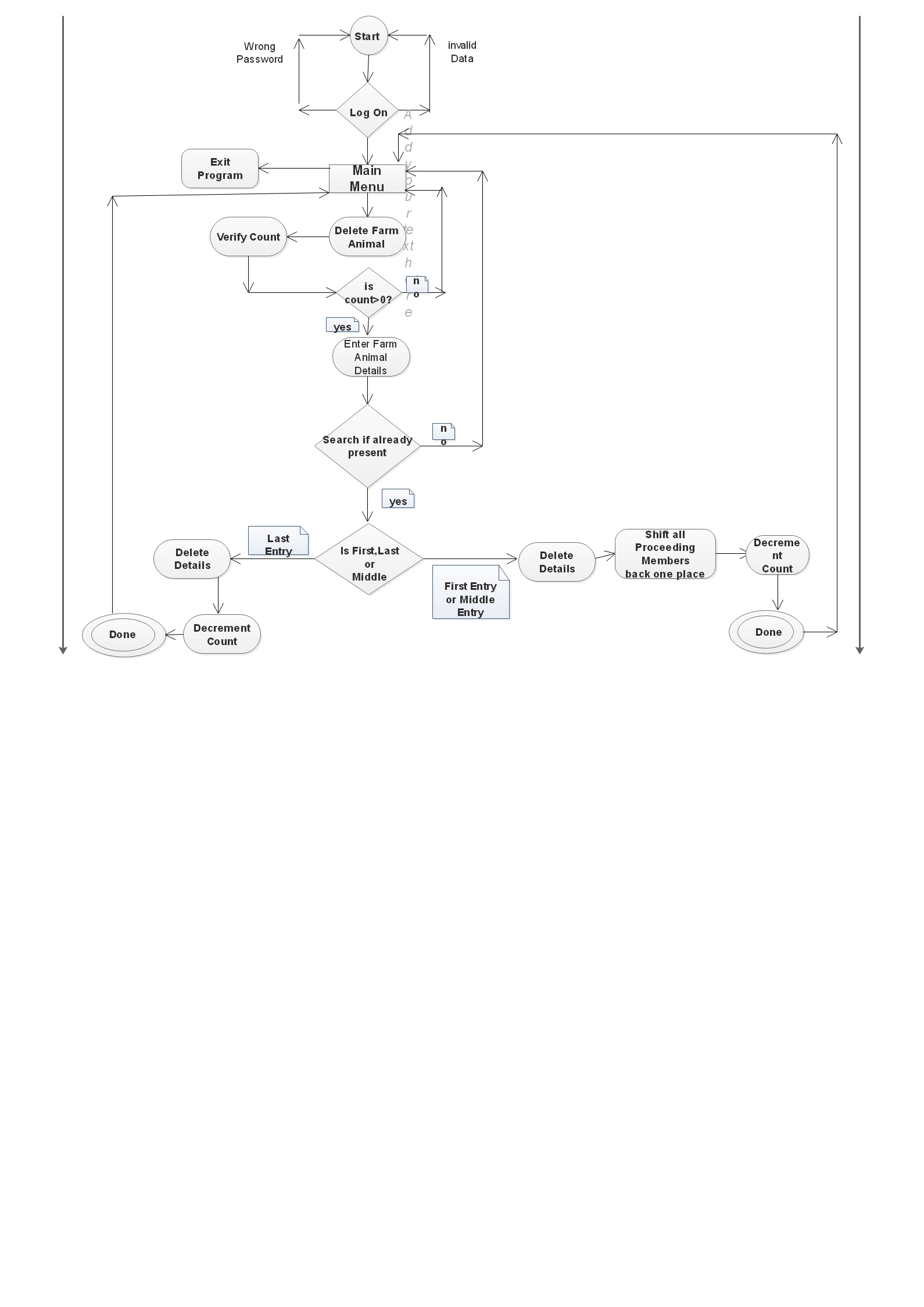
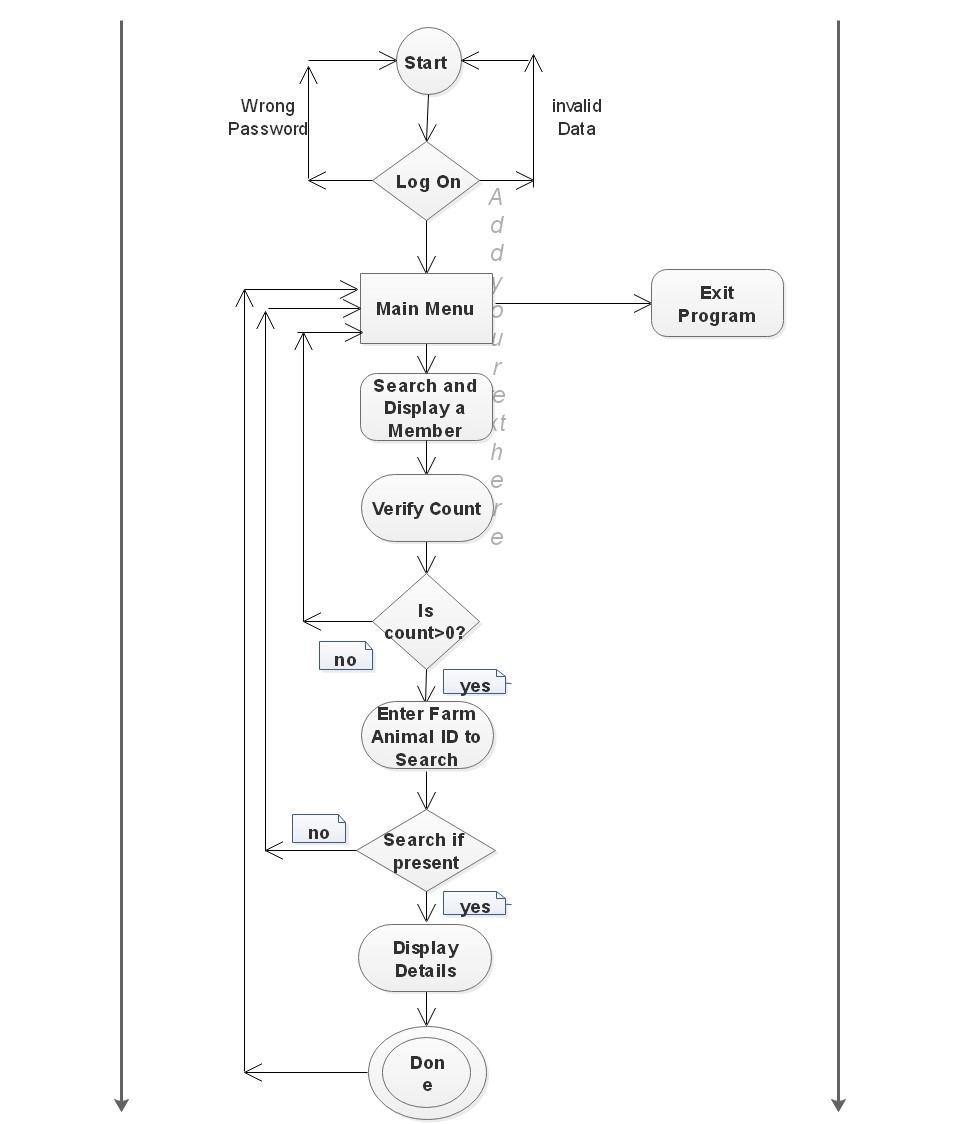
Use-Case 2:         Container searches for a member in the database as part of
                    create or delete functions.

Scenario 2a:        Container searches and finds a member in the database.

Preconditions:      Container has been initialized with values.
                    Counter variable is accessible.
		    A temporary object to be searched for has been passed in to the
		    function as well as a boolean value to return the result of the
		    search.

Trigger:            The specialized search function is activated as a result of the user
                    calling the create, delete or amend function.

Description:        The system loops through the container iteratively to search for the
                    member that has been requested by either the create, delete or amend
                    function, and finds the member in the container.

Post-condition:     The index number of the member found has been returned and the boolean
                    value has been set to true. The user is then returned to the outer
                    calling function.

Scenario 2b:        Container searches for a member in the database but the member is not
                    found.

Pre-conditions:     Container has been initialized with values set.
                    Counter variable is accessible. A temporary
		    object to be searched for has been passed into the function as well
	            as a boolean value to return the result of the search.

Trigger:            Either the create, delete or amend functions call on the overloaded
                    function search.

Description:        The system loops through the container iteratively to search for the
                    member that has been requested by either the delete, search or amend
                    function. The system reaches the end of the loop but the member has not
                    been found in the container.

Post-description:   The specialized function returns the value of false and the user is
                    returned to the outer calling function.

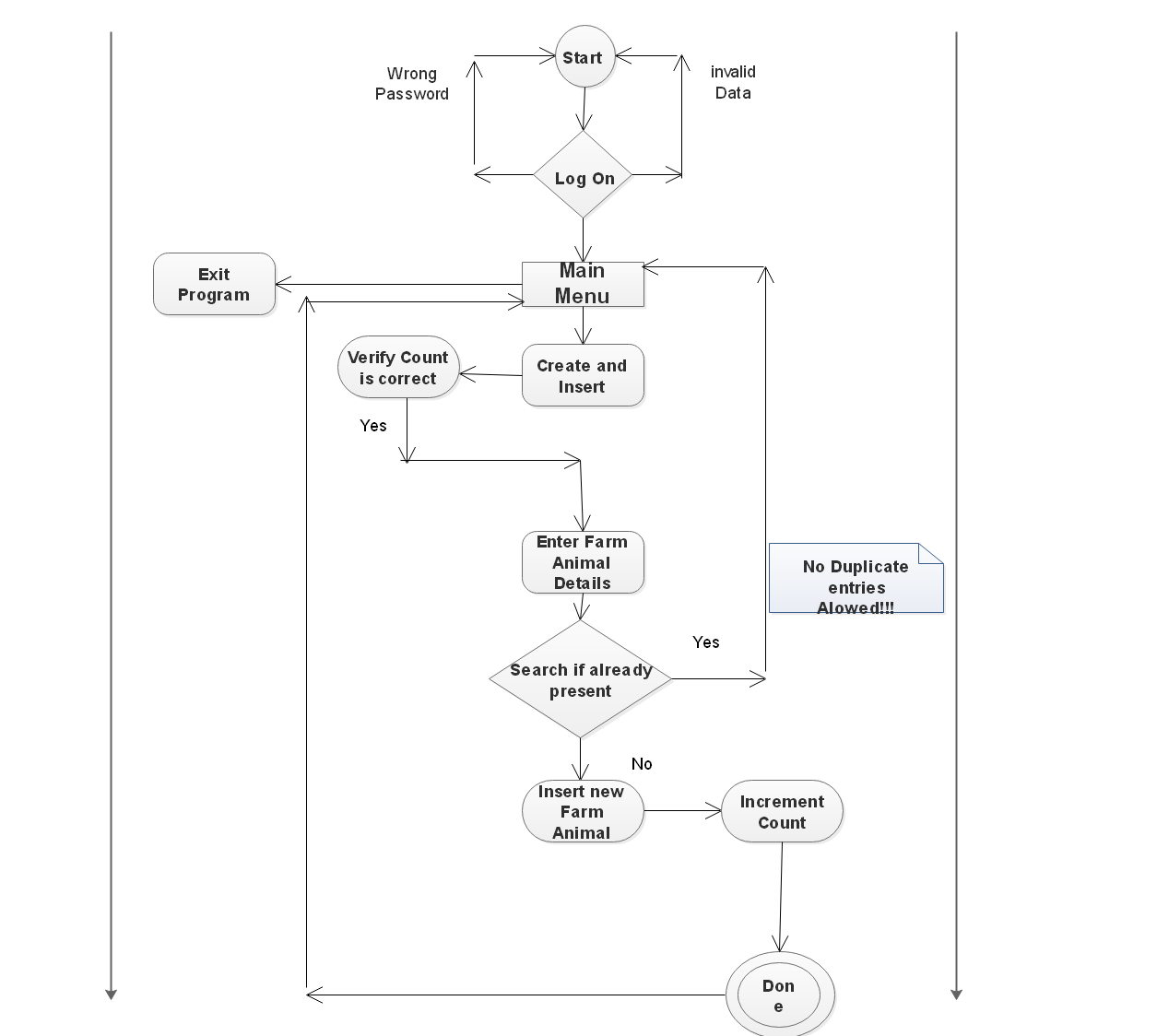
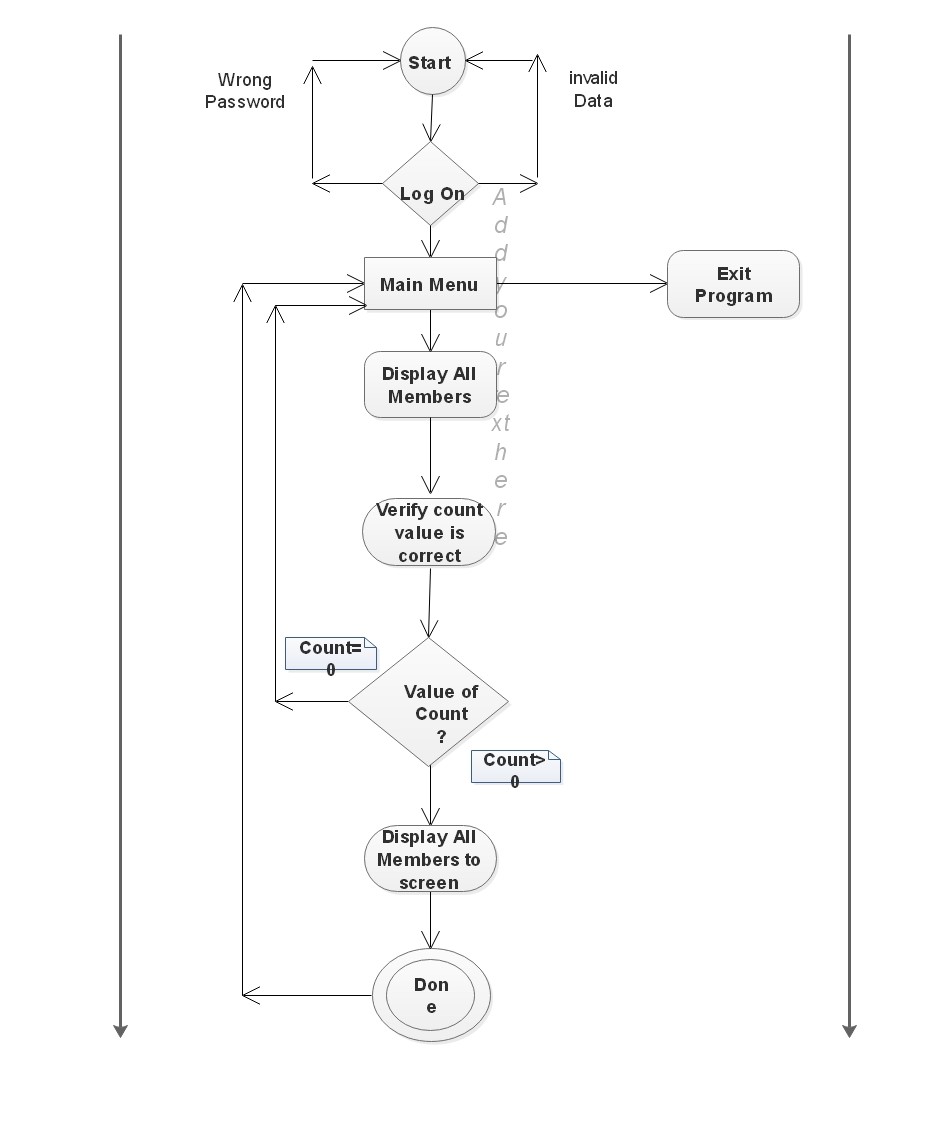
Use-Case 3:         Container verifies that the Count variable is equal to the number of
                    Farm animals in the database.

Scenario 3a:        The verification is successful.

Pre-conditions:     Container has been initialized with values set. Counter variable
                    is accessible.

Trigger:            The system verifies the count of members in the database.

Description:        The system loops through the container and using a separate local
                    count variable named check, registers the presence of each filled member
                    of the database. When the loop is complete the counter variable passed
                    to the function and the local count value are compared for equality.
	            The test is a success and the user is notified of the same.

Post-Condition:     User is informed that the counter variable verification was a success
                    and is returned to their main menu.

Scenario 3b.        The verification is unsuccessful.

Pre-conditions:     Container has been initialized with values set and has made a copy of
                    itself for processing. Counter variable is accessible.

Trigger:            The system verifies the count of members in the database.

Description:        The system loops through the container and using a separate local
                    count variable named check, registers the presence of each filled member
                    of the database. On this occasion, when the passed counter value and the
	          local count value are compared for equality, test has failed and
			  the user is informed of the failure.

Post-condition:     User is informed of the failure. The (shared) counter object has been
                    corrected.

Use-Case 4:         The system notifies the Data Administrator if the maximum capacity of
                    the container has been reached or if the container is within 10 remaining
                    vacant members being reached.

Scenario 4a         Maximum or near maximum capacity has not been reached.

Pre-conditions:     Container has been initialized with values set. Counter variable
                    is accessible.

Trigger:            Container checks for maximum capacity of container.

Description:        The value of the counter variable is checked against the value of the
                    maximum capacity variable -10 and is found to be lesser.

Post-Description:   There are 10 or more free spaces left in the database.

Scenario 4b.        Near maximum capacity has been reached.

Pre-conditions:     Container has been initialized with values set. Counter variable is
                    accessible.

Trigger:            Container checks for maximum capacity of container.

Description:        The value of the counter variable is checked against the value of the
                    maximum capacity variable-10 and is found to be within that range.

Post-conditions:    The user has been informed that they are nearing the maximum capacity
                    allowed for in the container so as to allow them the opportunity to be
                    prepared to create extra room or inform the programmer to do so.

Scenario 4c.        Full container capacity has been reached.

Pre-conditions:     Container has been initialized with values set. Counter variable is
                    accessible.

Trigger:            Container object checks for maximum capacity of container.

Description:        The value of the counter variable is checked against the value of the
                    maximum capacity variable and is found to be the same ie. The container
                    has reached its maximum capacity.

Post-condition:     The user has been informed that the maximum container capacity has been
                    reached and is advised to delete outdated members to make more space
                    or contact the programmer to expand the capacity of the system.

Use-Case 5:         Container checks whether it is filled with file data and that data is non-
                    initialization data.

Scenario 5a.        Container is filled with at least one farm animals details.

Pre-conditions:     Container has been initialized with values set. Counter variable is
                    accessible.


Trigger:            The system automatically checks before accounting operations begin.

Description:        The system runs a check to ascertain whether the first entry in
                    the container contains farm animal details using verify count function
		and counter value is greater than 1. The test is a success.

Post-condition:     Function returns success.

Scenario 5b.        Container is not filled with any farm animal details.

Pre-conditions:     Container has been initialized with values set. Counter variable is
                    accessible.

Trigger:            System automatically checks if container has been loaded with file data.

Description:        The system runs a check to ascertain whether the first entry in
                    the container contains farm animal details using the function VerifyCount.
	          The test fails.

Post-condition:     Function returns false.


Use-Case 6:         Container uses index key to display one of it’s members

Pre-conditions:     Container has been initialized with values set. Counter variable is
                    accessible.


Trigger:            Container calls display member function.

Description:        The container uses the index key passed to the function to display the
                    Details of the member.

Post-condition:     The user is returned to their main menu.
Use Case 1.                Data Administrator Logs in to system

Scenario 1a.               Data Administrator Logs in Successfully

Preconditions:             The Data Administrator has opened the program and has identified
                           themselves to the system.

Trigger:                   The system has requested the identity of the user

Description:               As soon as the user has entered the program the system requests the
                           identity of the user. The user selects the Data Administrator option
	                    and requested for his or her password to log in. The Data
		         Administrator enters their password, submits it and is then
	             presented with their main menu.

Post-conditions:           The password the Data Administrator entered authenticates them
                           successfully and they are now logged on and presented with their
						   menu of options.

Scenario 1b.               Data Administrator is unsuccessful logging in

Preconditions:             The Data Administrator has opened the program and has identified
                           themselves to the system
Trigger:                   The system has requested the identity of the user

Description:               As soon as the user has entered the program the system requests the
                           identity of the user. The Data Administrator either enters the
	                  password,submits it and the password is incorrect or the Data
	                  Administrator has tried to log on as a different user submitting
                           an incorrect password, and the Data Administrator is refused
	                  access to the system.

Post-conditions:           The Data Administrator is refused permission to log on and is
                           informed of the same by the system.